
Well Barrier Diagram Studio
Create and validate well barrier diagrams with confidence.
Create, review, validate and export well barrier diagrams through one guided interface.
The tool helps engineers and safety specialists create clear, structured well barrier diagrams without unnecessary complexity. Users can build a base diagram, review the well structure, highlight primary and secondary barriers, adjust key details and export the result through one controlled workflow.
It gives teams a practical way to understand how a well is protected, which barriers are in place and whether the diagram is complete, consistent and ready to support technical review.
Home > Well Barrier Diagram Studio
Why
Barrier diagrams should make well integrity easier to understand.
A well barrier diagram is more than a drawing. It shows how a well is protected, which elements form the primary and secondary barriers and where attention may be needed. When diagrams are difficult to create or hard to interpret, important details can be missed.
This module makes barrier information visual, structured and easier to review. Teams can work from one clear view instead of relying on disconnected drawings, files or manual interpretation. A shocking improvement, apparently: making safety information actually readable.
-
Clear primary and secondary barrier visualization.
-
Guided setup for well barrier diagrams.
-
Selectable diagram elements.
-
Architecture tree for well structure.
-
Easy editing through a properties panel.
-
Validation feedback before export.
-
Structured overview of barrier elements and notes.
Challenges
Well barrier information is often harder to review than it should be.
The module are essential for understanding well integrity, but creating and maintaining them can be time-consuming. Information may be spread across drawings, documents, spreadsheets and engineering notes. This makes it harder to see which barriers are in place, how they relate to the well structure and whether the diagram is complete.
For engineers, reviewers and safety specialists, the real need is simple: a clear diagram, a reliable overview and a controlled way to make updates.
-
Barrier information can be spread across multiple sources.
-
Primary and secondary barriers are not always easy to distinguish.
-
Updates may be difficult to track or review.
-
Diagram consistency depends too much on manual work.
-
Missing or invalid elements can be hard to spot.
-
Reviewers need clearer context before approving or using the diagram.
The solution
One guided workspace for well barrier diagrams.
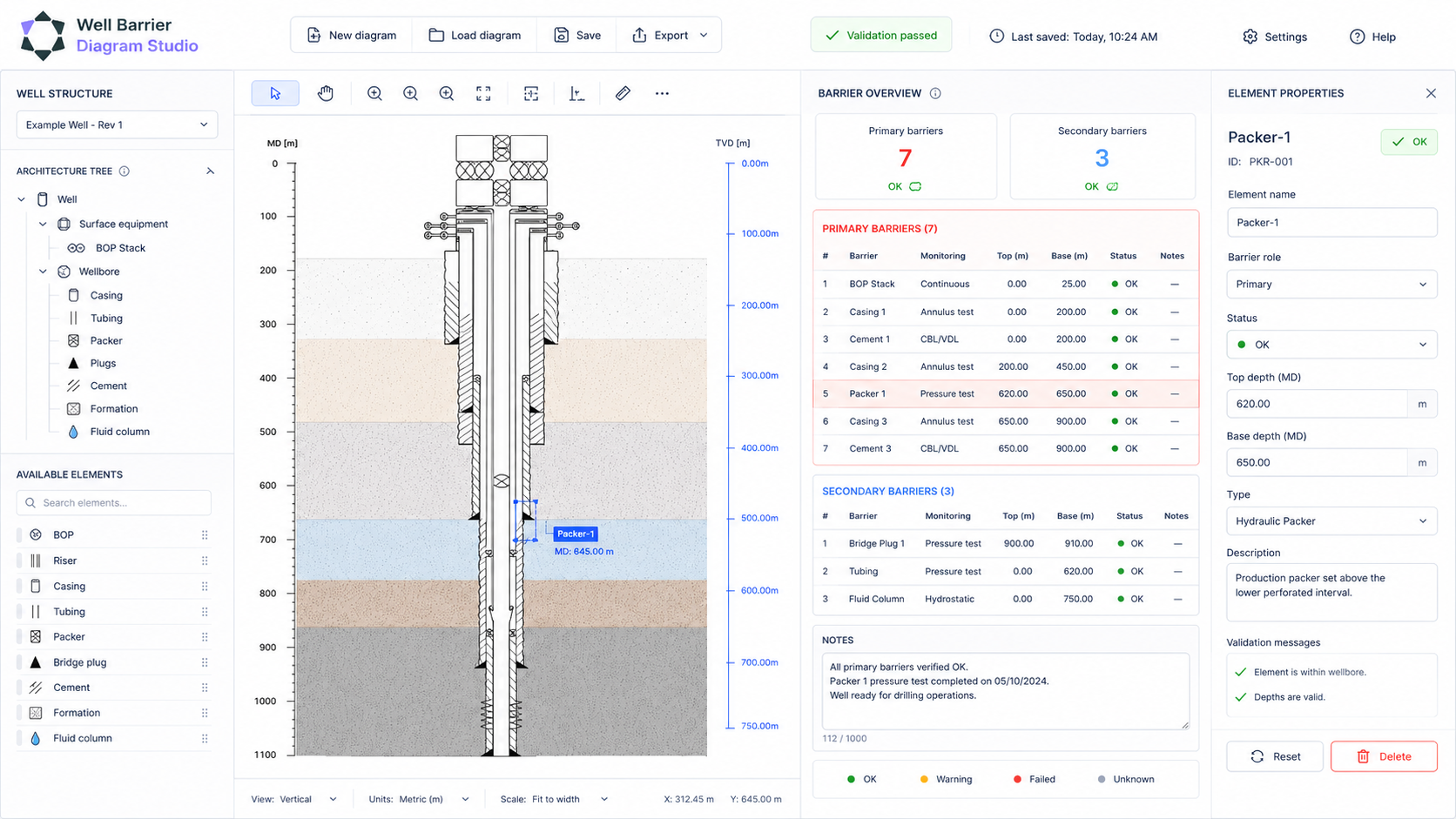
This solution brings the full diagram-building process into one clear workspace. Users can create a well barrier diagram, select elements, review barrier roles, update properties and check the diagram before export.
The interface keeps the well structure, barrier overview and element details visible together. This helps teams work faster, reduce mistakes and create diagrams that are easier to understand, share and trust.
How it works
From well structure to validated barrier diagram.
This module guides users through a practical workflow for creating and reviewing well barrier diagrams. Each step keeps the diagram clear, structured and ready for technical use.
1.
Start with the well structure.
Create or load a base well diagram and define the key elements that need to be shown.
2.
Visualize the barriers.
Display the well barrier elements directly in the diagram, with clear primary and secondary barrier indicators.
3.
Select and review elements.
Click elements in the diagram or architecture tree to inspect their role, depth, type and status.
4.
Update
details.
Use the properties panel to adjust key information while keeping the diagram visible.
5.
Validate
and export.
Check the diagram for missing or invalid information, then export it for review, reporting or documentation.
1.
Start with the well structure.
Create or load a base well diagram and define the key elements that need to be shown.
2.
Visualize the barriers.
Display the well barrier elements directly in the diagram, with clear primary and secondary barrier indicators.
3.
Select and review elements.
Click elements in the diagram or architecture tree to inspect their role, depth, type and status.
4.
Update
details.
Use the properties panel to adjust key information while keeping the diagram visible.
5.
Validate and export.
Check the diagram for missing or invalid information, then export it for review, reporting or documentation.
Product experience
Designed around clarity, review and control.
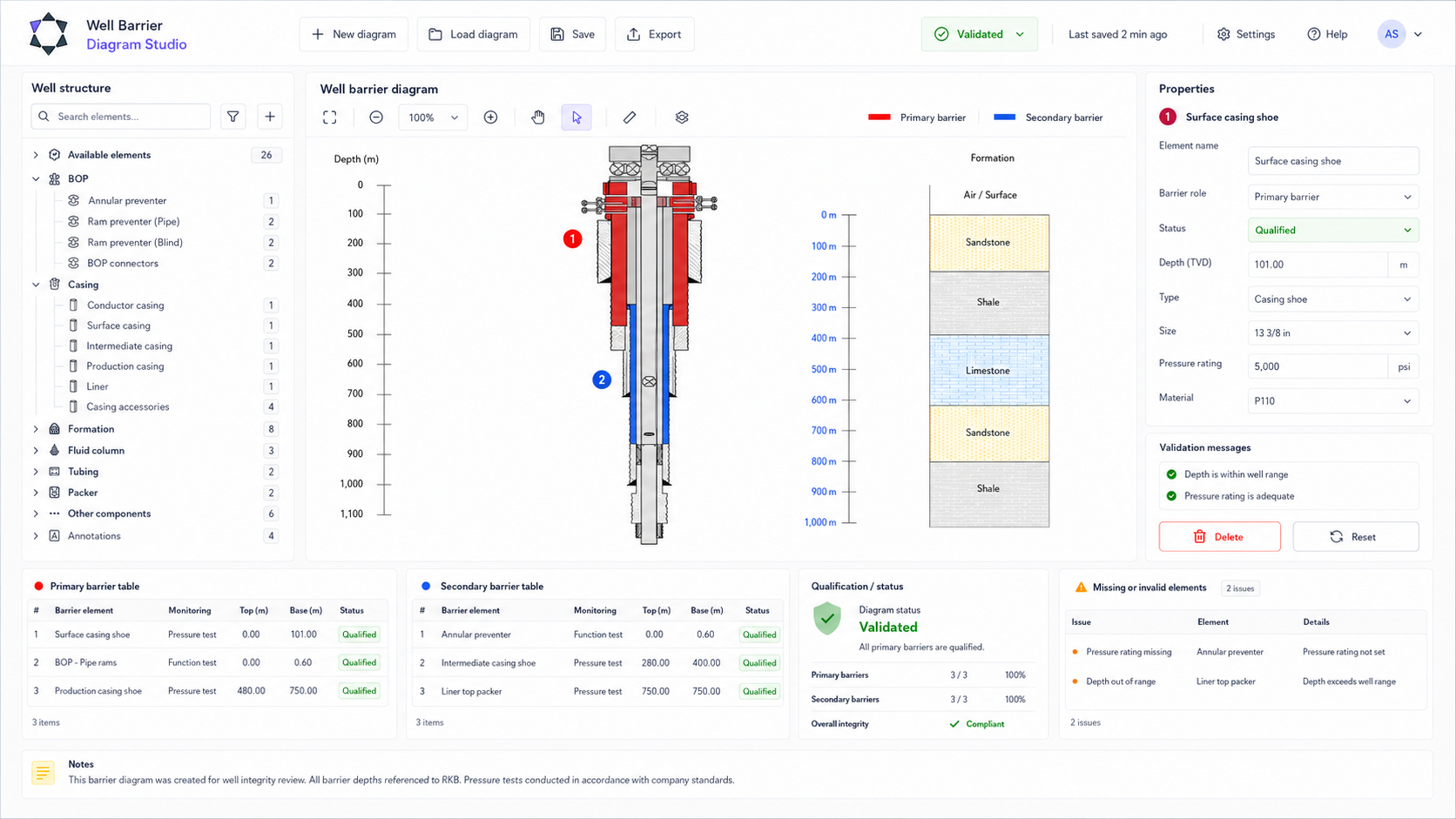
The interface is built to keep important information visible. The diagram shows the well and barriers. The architecture tree shows structure. The barrier overview explains what belongs to the primary and secondary barrier. The properties panel gives users a controlled place to review and update details.
Core capabilities
Everything needed to create clear, controlled barrier diagrams.
The solution combines diagram creation, barrier visualization, element review, validation and export in one practical workspace.

Guided setup wizard.

Land-based barrier diagram creation.

Primary and secondary barrier table.

BOP support.

Formation context.

Diagram selection.

Architecture tree selection.

Properties panel editing.

Validation after changes.

Import and export workflow.

Model-first configuration.

Derived diagram, tree and export states.

Controlled user interaction.

Clear validation feedback.
Benefits
What this means in practice.
This tool helps teams create diagrams that are easier to understand, easier to review and easier to trust. It turns barrier information into a clear visual overview that supports well integrity discussions, technical assurance and decision-making.
Clearer barrier understanding.
Primary and secondary barriers are shown visually, making the well protection strategy easier to interpret.
Faster
review.
Engineers and safety specialists can inspect diagram elements, barrier roles and status in one workspace.
Better consistency.
A guided structure helps teams create diagrams in a more controlled and repeatable way.
Stronger confidence.
Validation and overview tables help identify missing or unclear information before the diagram is shared or exported.
Clearer barrier understanding.
Primary and secondary barriers are shown visually, making the well protection strategy easier to interpret.
Faster
review.
Engineers and safety specialists can inspect diagram elements, barrier roles and status in one workspace.
Better
consistency.
A guided structure helps teams create diagrams in a more controlled and repeatable way.
Stronger
confidence.
Validation and overview tables help identify missing or unclear information before the diagram is shared or exported.
Who it's for
Built for teams that need clear well barrier understanding.
This module is designed for users who need to create, review, explain or validate well barrier diagrams as part of well integrity and safety assurance work.

Well engineers.

Safety specialists.

Well integrity teams.

Technical reviewers.

Software teams supporting well integrity workflows.

Training and assurance teams.

Organizations working with land-based well barrier diagrams.
Built with control
One internal model. Multiple reliable views.
The application uses a model-first approach where the internal configuration is the source of truth. Changes are validated and then used to derive diagram render state, barrier overview state, tree state and export state. This ensures consistency across all outputs.
Component action.
-
Facade command
-
Update internal model
-
Validate
-
Transform
-
Publish diagram, tree, overview and export state
See how Well Barrier Diagram Studio helps teams create clear, structured and validated barrier diagrams through one guided workspace.
Make well barrier diagrams easier to build, review and trust.